
142 lines
7.3 KiB
Markdown
142 lines
7.3 KiB
Markdown
# Max Rects Packer
|
|
|
|
[](https://travis-ci.org/soimy/maxrects-packer)
|
|
[](https://coveralls.io/github/soimy/maxrects-packer?branch=master)
|
|
[](https://badge.fury.io/js/maxrects-packer)
|
|

|
|

|
|
|
|
A simple max rectangle 2d bin packing algorithm for packing glyphs or images into multiple sprite-sheet/atlas. Minimalist with no module dependency.
|
|
|
|
This is a evolved version of [Multi-Bin-Packer](https://github.com/marekventur/multi-bin-packer) with much efficient packing algorithm. All interfaces and methods are inherited so no tweaks needed in your current code except module name.
|
|
|
|
It differs from the long list of similar packages by its packing approach: Instead of creating one output bin with a minimum size this package is trying to create a minimum number of bins under a certain size. This avoids problems with single massive image files that are not browser-friendly. This can be especially useful for WebGL games where the GPU will benefit from spritesheets close to power-of-2 sizes.
|
|
|
|
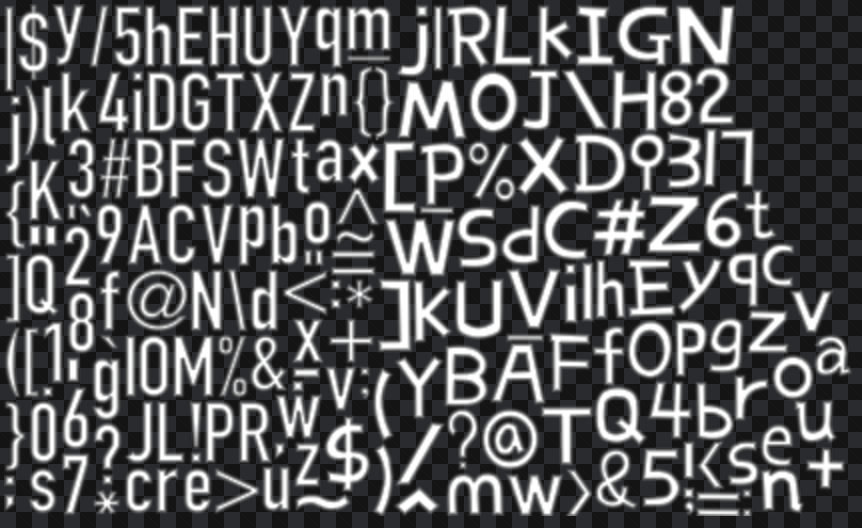
And you can also save/load to reuse packer to add new sprites. (Below is a demo atlas packed with two difference bitmap fonts)
|
|
|
|
|
|
|
|
## [Changelog](https://github.com/soimy/maxrects-packer/blob/master/CHANGELOG.md)
|
|
|
|
## Installing
|
|
|
|
```bash
|
|
npm install maxrects-packer --save
|
|
```
|
|
|
|
## Usage
|
|
|
|
**Note:** *Since version 2.0.0 Max Rects Packer is rewritten in `typescript` and change the import method from old `require("maxrects-packer")` to `require("maxrects-packer").MaxRectsPacker` or more fashioned `import` statement.*
|
|
|
|
**Note:** *Since version 2.1.0 packer can be fed with any object with `width & height` members, no need to follow `{ width: number, height: number, data: any }` pattern, if you are using `typescript`, that also mean any class extending `MaxRectsPacker.IRectangle`*
|
|
|
|
**Note:** *Since version 2.1.0 Rectangle class constructor API is changed from `new Rectangle(x, y, width, height, rotated)` to `new Rectangle(width, height, x, y, rotated)`, cos most cases you only need to feed w/h and omit the rest like `new Rectangle(100, 100)` and left `x,y,rotated` to default value.
|
|
|
|
```javascript
|
|
let MaxRectsPacker = require("maxrects-packer").MaxRectsPacker;
|
|
const options = {
|
|
smart: true,
|
|
pot: true,
|
|
square: false,
|
|
allowRotation: true,
|
|
tag: false,
|
|
border: 5
|
|
}; // Set packing options
|
|
let packer = new MaxRectsPacker(1024, 1024, 2, options); // width, height, padding, options
|
|
|
|
let input = [ // any object with width & height is OK since v2.1.0
|
|
{width: 600, height: 20, name: "tree", foo: "bar"},
|
|
{width: 600, height: 20, name: "flower"},
|
|
{width: 2000, height: 2000, name: "oversized background", {frameWidth: 500, frameHeight: 500}},
|
|
{width: 1000, height: 1000, name: "background", color: 0x000000ff},
|
|
{width: 1000, height: 1000, name: "overlay", allowRotation: true}
|
|
];
|
|
|
|
packer.addArray(input); // Start packing with input array
|
|
packer.next(); // Start a new packer bin
|
|
packer.addArray(input.slice(2)); // Adding to the new bin
|
|
packer.bins.forEach(bin => {
|
|
console.log(bin.rects);
|
|
});
|
|
|
|
// Reuse packer
|
|
let bins = packer.save();
|
|
packer.load(bins);
|
|
packer.addArray(input);
|
|
|
|
```
|
|
|
|
## Test
|
|
|
|
```bash
|
|
npm test
|
|
```
|
|
|
|
## API
|
|
|
|
Note: maxrects-packer requires node >= 4.0.0
|
|
|
|
#### ```new MaxRectsPacker(maxWidth, maxHeight[, padding, options])```
|
|
|
|
Creates a new Packer. maxWidth and maxHeight are passed on to all bins. If ```padding``` is supplied all rects will be kept at least ```padding``` pixels apart.
|
|
|
|
- `options.smart` packing with smallest possible size. (default is `true`)
|
|
- `options.pot` bin size round up to smallest power of 2. (default is `true`)
|
|
- `options.square` bin size shall alway be square. (default is `false`)
|
|
- `options.allowRotation` allow 90-degree rotation while packing. (default is `false`)
|
|
- `options.tag` allow tag based group packing. (default is `false`)
|
|
- `options.exclusiveTag` tagged rects will have dependent bin, if set to `false`, packer will try to put tag rects into the same bin (default is `true`)
|
|
- `options.border` atlas edge spacing (default is 0)
|
|
|
|
#### ```packer.add(width, height, data)``` +1 overload
|
|
|
|
Adds a rect to an existing bin or creates a new one to accommodate it. ```data``` can be anything, it will be stored along with the position data of each rect.
|
|
|
|
#### ```packer.add({width: number, height: number, ... })``` +1 overload
|
|
|
|
Adds a rect to an existing bin or creates a new one to accommodate it. Accept any object with `width & height`. If you are using `typescript`, that means any class extends `MaxRectsPacker.IRectangle`
|
|
|
|
#### ```packer.addArray([{width: number, height: number, ...}, ...])```
|
|
|
|
Adds multiple rects. Since the input is automatically sorted before adding this approach usually leads to fewer bins created than separate calls to ```.add()```
|
|
|
|
#### ```packer.repack(quick: boolean = true)```
|
|
|
|
Repack all elements inside bins. If `quick == true`, only bins with `dirty` flag will be repacked. If `false` is passed, all rects inside this packer will be re-sort and repacked, might result different bin number. Slower but high packing efficiency.
|
|
|
|
#### ```packer.next()```
|
|
|
|
Stop adding new element to the current bin and return a new bin. After calling `next()` all elements will no longer added to previous bins.
|
|
|
|
#### ```let bins = packer.save()```
|
|
|
|
Save current bins settings and free area to an Array of objects for later use. Better to `JSON.stringify(bins)` and store in file.
|
|
|
|
#### ```packer.load(bins)```
|
|
|
|
Restore previous saved `let bins = JSON.parse(fs.readFileSync(savedFile, 'utf8'));` settings and overwrite current one. Continue packing and previous packed area will not be overlapped.
|
|
|
|
#### ```packer.bins```
|
|
|
|
Array of bins. Every bin has a ```width``` and ```height``` parameter as well as an array ```rects```.
|
|
|
|
#### ```packer.bins[n].rects```
|
|
|
|
Array of rects for a specific bin. Every rect has ```x```, ```y```, ```width```, ```height```, ```rot``` and ```data```. In case of an rect exceeding ```maxWidth```/```maxHeight``` there will also be an ```oversized``` flag set to ```true```.
|
|
|
|
## Support for 90-degree rotation packing
|
|
|
|
If `options.allowRotation` is set to `true`, packer will attempt to do an extra test in `findNode()` on rotated `Rectangle`. If the rotated one gives the best score, the given `Rectangle` will be rotated in the `Rectangle.rot` set to `true`.
|
|
|
|
## Support for tag based group packing
|
|
|
|
If `options.tag` is set to `true`, packer will check if the input object has `tag: string` property, all input with same `tag` will be packed in the same bin.
|
|
|
|
## Support for oversized rectangles
|
|
|
|
Normally all bins are of equal size or smaller than ```maxWidth```/```maxHeight```. If a rect is added that individually does not fit into those constraints a special bin will be created. This bin will only contain a single rect with a special "oversized" flag. This can be handled further on in the chain by displaying an error/warning or by simply ignoring it.
|
|
|
|
## Packing algorithm
|
|
|
|
Use Max Rectangle Algorithm for packing, same as famous **Texture Packer**
|