
892 B
892 B
Installation
Based on the used Unity version, please fellow the following steps to install com.unity.sharp-zip-lib package.
Unity 6
- Open Package Manager Window
- Select Unity Registry on the left side bar
- Search for
SharpZipLiband click Install

Earlier Unity Versions (Unity 2018.x and up)
-
Make sure git is installed in the system.
-
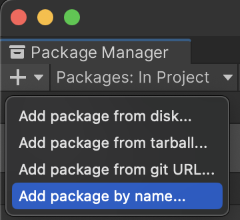
Click the + button, and choose Add package by name
In Unity 2020.x or earlier, choose Add package from git URL
-
Type in
com.unity.sharp-zip-liband click the Add button. We can also specify a particular version by appending@<version>, for example:com.unity.sharp-zip-lib@1.3.5-preview
